Photo Blender: Collage Maker for mobile double-exposure and collages
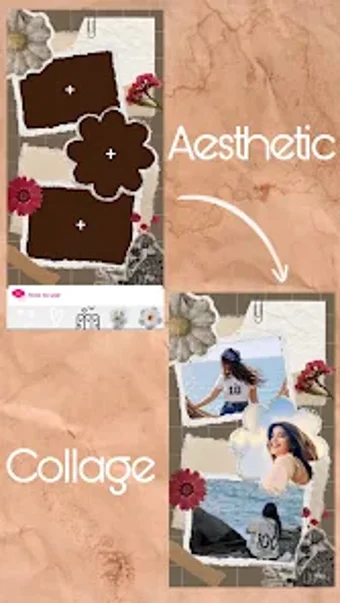
Photo Blender: Collage Maker, developed by vindiaapp, is an Android photography app for producing blended images and social-ready collages. The app combines image-mixing tools for layered exposures with a compact layout system that helps compose grid and framed collages, alongside a light photo editor for finishing touches. It targets social media creators and hobbyist photographers who want a mobile-centric workflow to prepare stylized posts quickly from a single device, and on-the-go editing.

Unlock your creativity with Adobe Stock
Get 10 images or 1 video with a free trial
A creative workspace that merges multiple editing intents
The app groups photo mixing, collage composition, and finishing tools inside a single editor, so creators can move from concept to shareable image without switching apps. It supports double exposure effects with adjustable transparency, offers a DP maker for profile images, and packs filters, stickers, and text overlays into the same editing flow. These elements aim to help users produce visually cohesive social content in one session.
On-device workflow and Android compatibility for mobile-first production
Available for Android devices, the tool is updated regularly to support current Android versions, which keeps the mobile workflow active on modern devices. The app integrates an auto background remover to isolate subjects directly on device, reducing the need for external tools. This combination favors rapid, phone-based editing rather than a multi-app desktop chain.
Output styling and community reception align with social platforms
Its feature set is geared toward Instagram-style outputs, with ready-made story templates and profile-picture borders that reflect current aesthetic trends. The application has surpassed 100,000 downloads and is noted for the quality of its blending effects, a concrete sign that the app produces socially acceptable visual results. Filters and overlay controls support finishing looks tuned to feed and story formats.
Accessible entry point, with depth for visual experimentation
The app is aimed at social media creators and hobbyist photographers who need immediate creative results; built-in tools reduce the barrier to layered compositions while still offering creative levers for exploration. Although it emphasizes stylish outputs, users editing portraits and profile photos should consider issues of representation and provenance when altering likenesses, given the app's focus on aesthetic trends.
Practical mobile choice for social-focused image making
The app is a pragmatic option for creators who prioritize quick, stylistic imagery for profiles and stories. Although it does not replace detailed desktop retouching workflows, its mobile-first design matches the needs of hobbyist photographers and social editors who iterate rapidly. Recommend it for producing on-device visual variations and profile-ready assets rather than as a substitute for studio-grade editing.